# User guide

# Introduction

As you arrive on this platform we invite you to:

Watch the help videos in our [welcome space](https://hub.transition-space.org/content/perma?id=8135)

Chose the [spaces](https://hub.transition-space.org/spaces) you want to join

If you need help then ask the Space host of the space you're in

If you would like a new space [ask here](https://hub.transition-space.org/s/welcome-space/survey/show/single?id=8)

<div id="bkmrk-"><div data-exclude="[]" data-include="[]" data-plugin-options="[]" data-ui-init="" data-ui-richtext="" data-ui-widget="ui.richtext.prosemirror.RichText" id="bkmrk--1"></div></div><iframe frameborder="0" id="bkmrk-%3E-1" scrolling="no" src="https://helpdesk.transition-space.org/help/3545223608" style="height: 900px; width: 100%;" title="Helpdesk">&gt;</iframe>

# Spaces

In Humhub posts are organised into 'spaces' these are communities that organise around a particular group or theme.

[![spaces.png](https://knowledge.transition-space.org/uploads/images/gallery/2023-10/scaled-1680-/spaces.png)](https://knowledge.transition-space.org/uploads/images/gallery/2023-10/spaces.png)
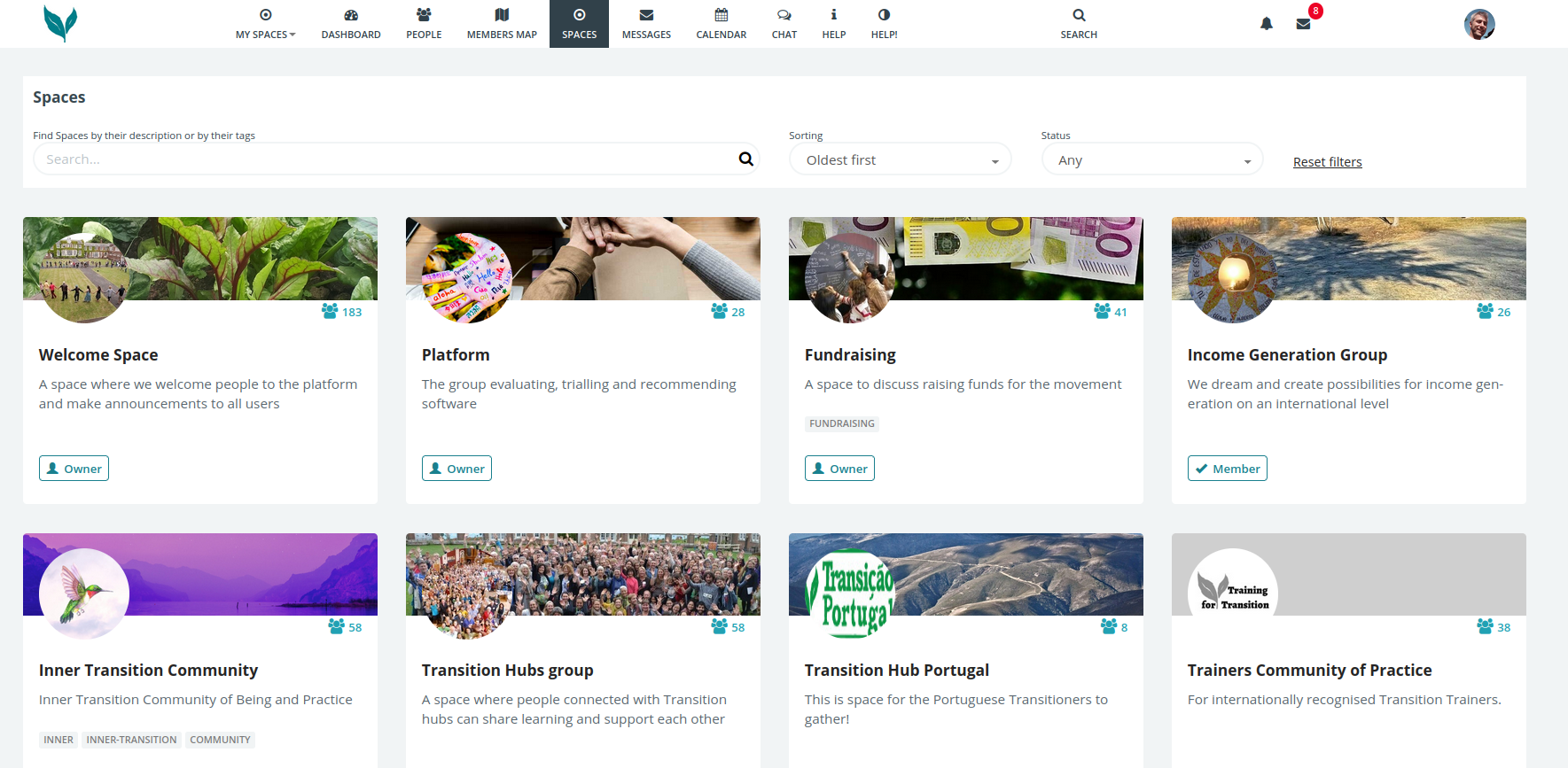
Everyone who joins is added to the Welcome space and the Community garden space.

The other spaces can be found here [https://hub.transition-space.org/spaces?sort=older](https://hub.transition-space.org/spaces?sort=older)

# Request a space

If you would like a new space then just [ask here](https://hub.transition-space.org/s/welcome-space/survey/show/single?id=8)

# Space hosts

### Permissions:

Space hosts can configure many of the permissions for their spaces.

They can access these by accessing [https://hub.transition-space.org/s/\*\*YOUR-SPACE-NAME/space/manage/security/permissions](https://hub.transition-space.org/s/**YOUR-SPACE-NAME/space/manage/security/permissions)

You access this by clicking on the grey settings wheel in your space and clicking on 'security'

[![security.png](https://knowledge.transition-space.org/uploads/images/gallery/2023-04/scaled-1680-/ZHFv2vifjfs6sp9D-security.png)](https://knowledge.transition-space.org/uploads/images/gallery/2023-04/ZHFv2vifjfs6sp9D-security.png)
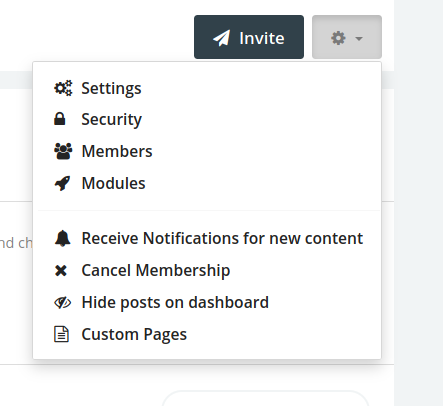
You will then see the settings that can be changed

[![settings.png](https://knowledge.transition-space.org/uploads/images/gallery/2023-04/scaled-1680-/EJlnE5Z4ft6c32w2-settings.png)](https://knowledge.transition-space.org/uploads/images/gallery/2023-04/EJlnE5Z4ft6c32w2-settings.png)
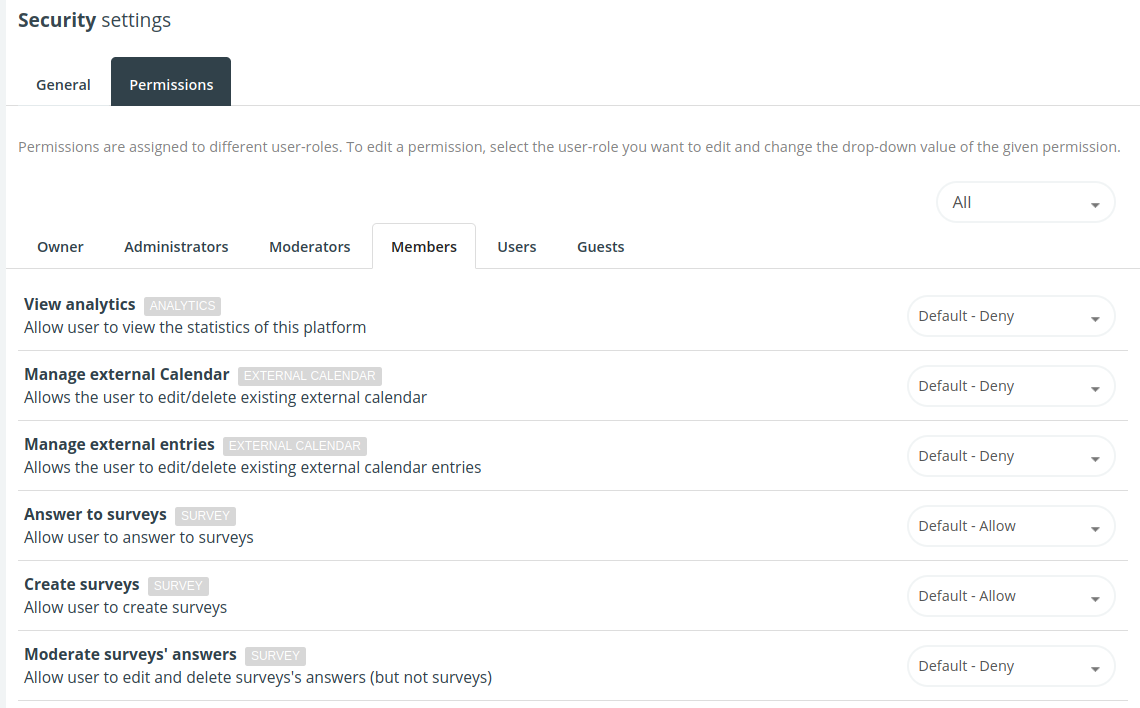
You can change any of these settings to your preference. If you would like advice about the implications of these settings then please ask in the[ space-hosts Mattermost channel](https://mattermost.transition-space.org/space-hosts/channels/town-square)

### Notifications

By default, users will have any posts in spaces they are members of added to their daily digest email.

<div id="bkmrk--2" style="position: relative;"><div class=""><div><div aria-label="At 9:38 AM Thursday, April 20, websupport replied, Yes, setting in the URL above.In terms of notifications, by default users will have any posts in spaces they are members of added to their daily digest email." class="a11y__section post same--root current--user post--thread" data-testid="" id="bkmrk--3" role="listitem" tabindex="0"><div class="post__content " data-testid="postContent" role="application"><div><div class="post__body"><div class="AutoHeight" style="transition-property: height; transition-duration: 250ms; transition-timing-function: ease; width: 100%; height: auto; overflow: visible;"><div><div class="post-message post-message--collapsed"><div class="post-message__text-container" style="max-height: 600px;"><div aria-readonly="true" class="post-message__text" dir="auto" id="bkmrk--4" tabindex="0"></div></div></div></div></div></div></div></div></div></div></div><div style="display: inline; width: 0px; height: 0px; z-index: -1; overflow: hidden; margin: 0px; padding: 0px;"><div dir="ltr" style="position: absolute; flex: 0 0 auto; overflow: hidden; visibility: hidden; z-index: -1; width: 100%; height: 100%; left: 0px; top: 0px;"><div style="flex: 0 0 auto; overflow: hidden; z-index: -1; visibility: hidden; inset: -9px -8px -8px -9px;"><div style="position: absolute; flex: 0 0 auto; visibility: hidden; overflow: scroll; z-index: -1; width: 100%; height: 100%;">  
</div><div style="position: absolute; flex: 0 0 auto; visibility: hidden; overflow: scroll; z-index: -1; width: 100%; height: 100%;">  
</div></div></div></div></div><div id="bkmrk--5" style="position: relative;"><div class=""><div><div aria-label="At 9:40 AM Thursday, April 20, websupport replied, If you want to do a specific notification (a separate email from the daily digest) then you could 'notify all' in the post. This will create a separate email just for that post. It will also create a push notification/popup to users that have enabled that in their browser or mobile device." class="a11y__section post same--root current--user same--user post--thread" data-testid="" id="bkmrk--6" role="listitem" tabindex="0"><div class="post__content " data-testid="postContent" role="application"><div><div class="post__header">  
</div></div></div></div></div></div></div>If you want to do a specific notification (a separate email from the daily digest) then you could 'notify all' in the post. This will create a separate email just for that post. It will also create a push notification/popup to users that have enabled that in their browser or mobile device.

### Archive

Space hosts are able to 'Archive' spaces

[![unarchive.png](https://knowledge.transition-space.org/uploads/images/gallery/2024-02/scaled-1680-/unarchive.png)](https://knowledge.transition-space.org/uploads/images/gallery/2024-02/unarchive.png)
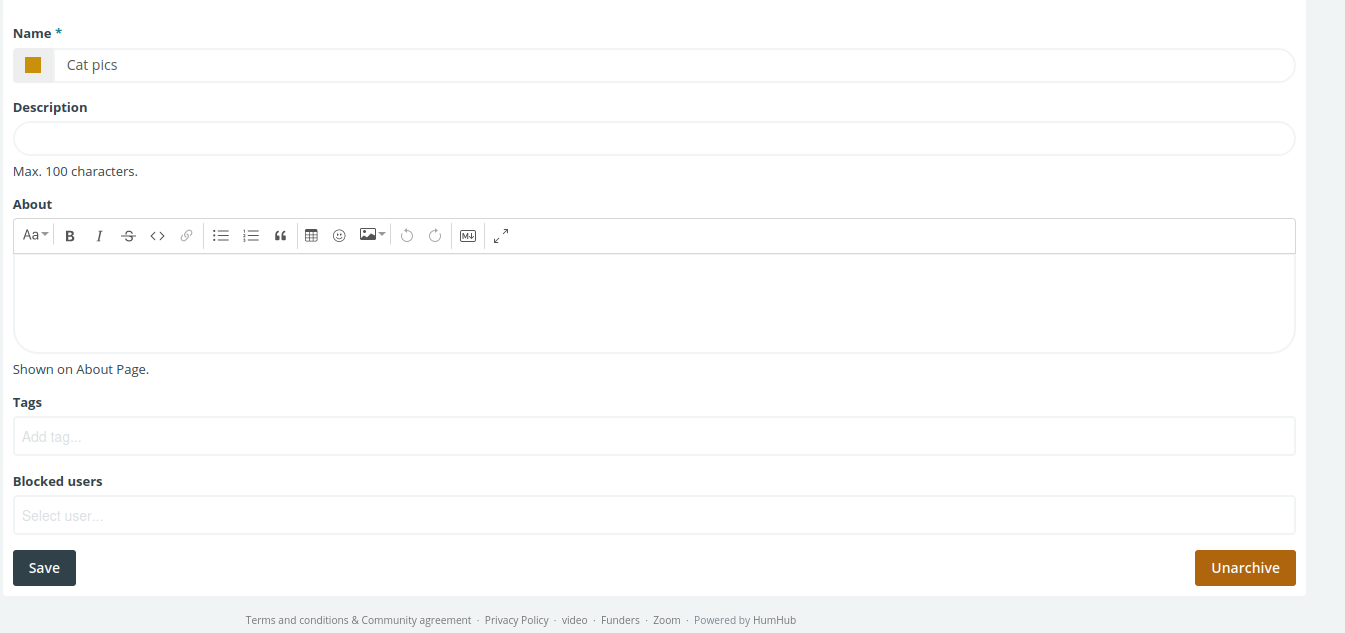
When spaces are archived:

- <span style="color: rgb(0, 0, 0); font-family: 'Open Sans', sans-serif; font-size: 13.5px; font-style: normal; font-variant-ligatures: normal; font-variant-caps: normal; font-weight: 400; letter-spacing: normal; text-align: left; text-indent: 0px; text-transform: none; word-spacing: 0px; -webkit-text-stroke-width: 0px; white-space: pre-wrap; background-color: rgb(255, 255, 255); display: inline !important; float: none;">All content is hidden to non-admins. It is no longer searchable (even by members of that space)</span>
- <span style="color: rgb(0, 0, 0); font-family: 'Open Sans', sans-serif; font-size: 13.5px; font-style: normal; font-variant-ligatures: normal; font-variant-caps: normal; font-weight: 400; letter-spacing: normal; text-align: left; text-indent: 0px; text-transform: none; word-spacing: 0px; -webkit-text-stroke-width: 0px; white-space: pre-wrap; background-color: rgb(255, 255, 255); display: inline !important; float: none;">Admins can 'un-archive' it at a later date and make it visible/ searchable by members.</span>
- <span style="color: rgb(0, 0, 0); font-family: 'Open Sans', sans-serif; font-size: 13.5px; font-style: normal; font-variant-ligatures: normal; font-variant-caps: normal; font-weight: 400; letter-spacing: normal; text-align: left; text-indent: 0px; text-transform: none; word-spacing: 0px; -webkit-text-stroke-width: 0px; white-space: pre-wrap; background-color: rgb(255, 255, 255); display: inline !important; float: none;"> The content remains accessible to admins even when in an archived state.</span>

<div class="AutoHeight" id="bkmrk--8" style="transition-property: height; transition-duration: 250ms; transition-timing-function: ease; width: 100%; height: auto; overflow: visible;"><div><div class="post-message post-message--collapsed"><div class="post-message__text-container" style="max-height: 600px;"><div aria-readonly="true" class="post-message__text" dir="auto" id="bkmrk--9" tabindex="0"></div></div></div></div></div>

# Vive Apps for mobile

Apps for Android and iOS are available.

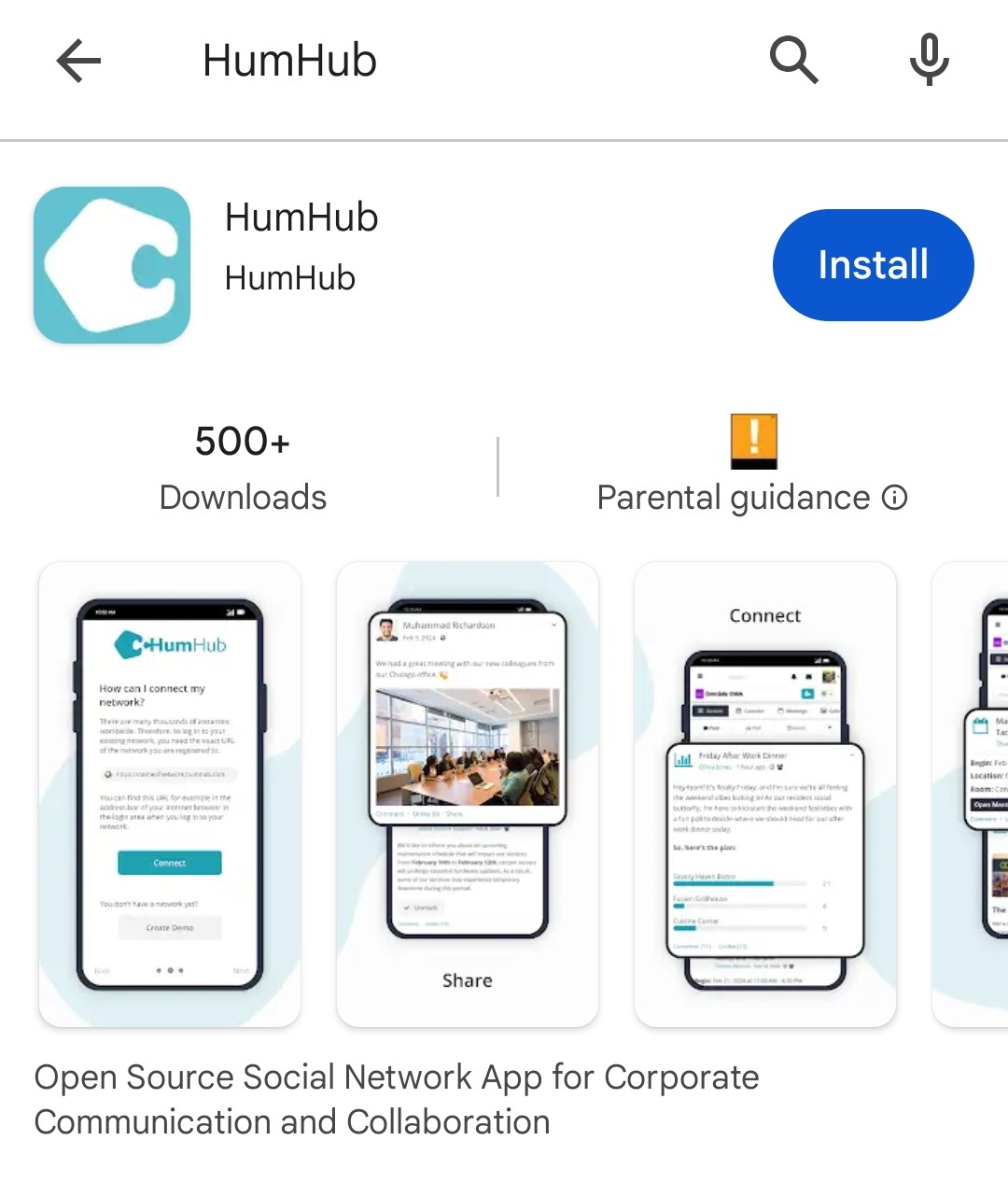
The Android app can be[ installed from the Play store ](https://play.google.com/store/apps/details?id=com.humhub.app)

The iPhone app can be installed from the [App store](https://apps.apple.com/en/app/humhub/id6446092274)

#### **If you use an Android or iOS phone you can now get Vive in your pocket, via the HumHub app!**

Here’s how to do it (text and pictures):

1. Go to the Google Play or app store and search for HumHub, or click one of the links above
![](https://lh7-us.googleusercontent.com/PU8GBIhcBO8NNpbSrM1dCnwHSgMxAiqDXoH0CPZCqsVoqLpQ2Rtho3COQEhr8Cr52L5exnRvXS0Nuo01XPgp4L6f7YIhKO2oQUP5Cxv_FccTx9Cdq5s-8Tp5qUlSQETQ0us2cGT95e-mRpNEhorB8LU)

2. Install and Open HumHub

![](https://lh7-us.googleusercontent.com/MDZRKSYLQd9c4xLRC4s6cBaqz5HT_HtOo8sM-Fe4AGDWylEHdMfaN9C51heamlUyF3i3k-fjxAOoA0Fg2f9pkCRMuXhWKgX0US-d46ltDe1fSZKLkb3Mz7TMwk8lvrdMkFblrQACKOm81iLHi-6A7os)

3. Enter the url - **[vive.transitiontogether.org.uk](http://vive.transitiontogether.org.uk)** and click Connect

![](https://lh7-us.googleusercontent.com/bAnt4Q9cSgLW3MjnalOKM3jtNTNS7ivQpEQhV-lkb6CQNek-p-T_uJHNYT_ichW2cve2FpSRqTwxmCxccxn0qqIxQY7kuTQMlG3LP3v0MMdQlTgZxxPuzxfvYMM6UsLPIB-ypHfiOATxEg06RsZgRQ4)

4. Now to log-in to Vive - click on Sign In/ Up

![](https://lh7-us.googleusercontent.com/V1Oy0mF_6UPhu1BlZH8dVp39jwnyGDVPghI8subhfkxcjuGYDZ01LqGbXFWFVkFifY6Oq344DxZ0i4A0z4Hm5h37BJG6rDzUmmCG52xcB8vpDiPlV-Loi2tj14w-oO4isWNaq6sOZUpS3Am3RXLosNE)

5. Click on Transition Platform ID

![](https://lh7-us.googleusercontent.com/h-A7meczXFn6-XLAMaIIdPDyxTX3SqOe_nZa9lpzNIwcxIai0vqQp9plX5AIP96cfmubf369IKS2aiJcW2tzYI6O1NdVeyp6deV5U8ZQ9MVQ0EGB1ixSUDbCpoRzSN8I8pr_rhHFnd6Pgb-chupyXFQ)

6. Enter your Email and Password and Sign In - (if you have any problems click on the red button to request our support)

![](https://lh7-us.googleusercontent.com/XWKfGU_3qiKEHFGAInmq-KNY_rGIYFK2kXiwV1IaCrPv1f632U4fpPJkTNcfrK_tDqVl7Z7wpuQgETyffoc9nkU6WtZq9UxYAArgtSbU3Oa4P1yrUjUvvNY8d-Soi5YP39rXMw97Y7FzYLBqGQc2ikA)

#### **You’re in! The HumHub app will remember the Vive url and your login details, so just click on the App and click Connect whenever you want to pop by 🙂**

# Calendars

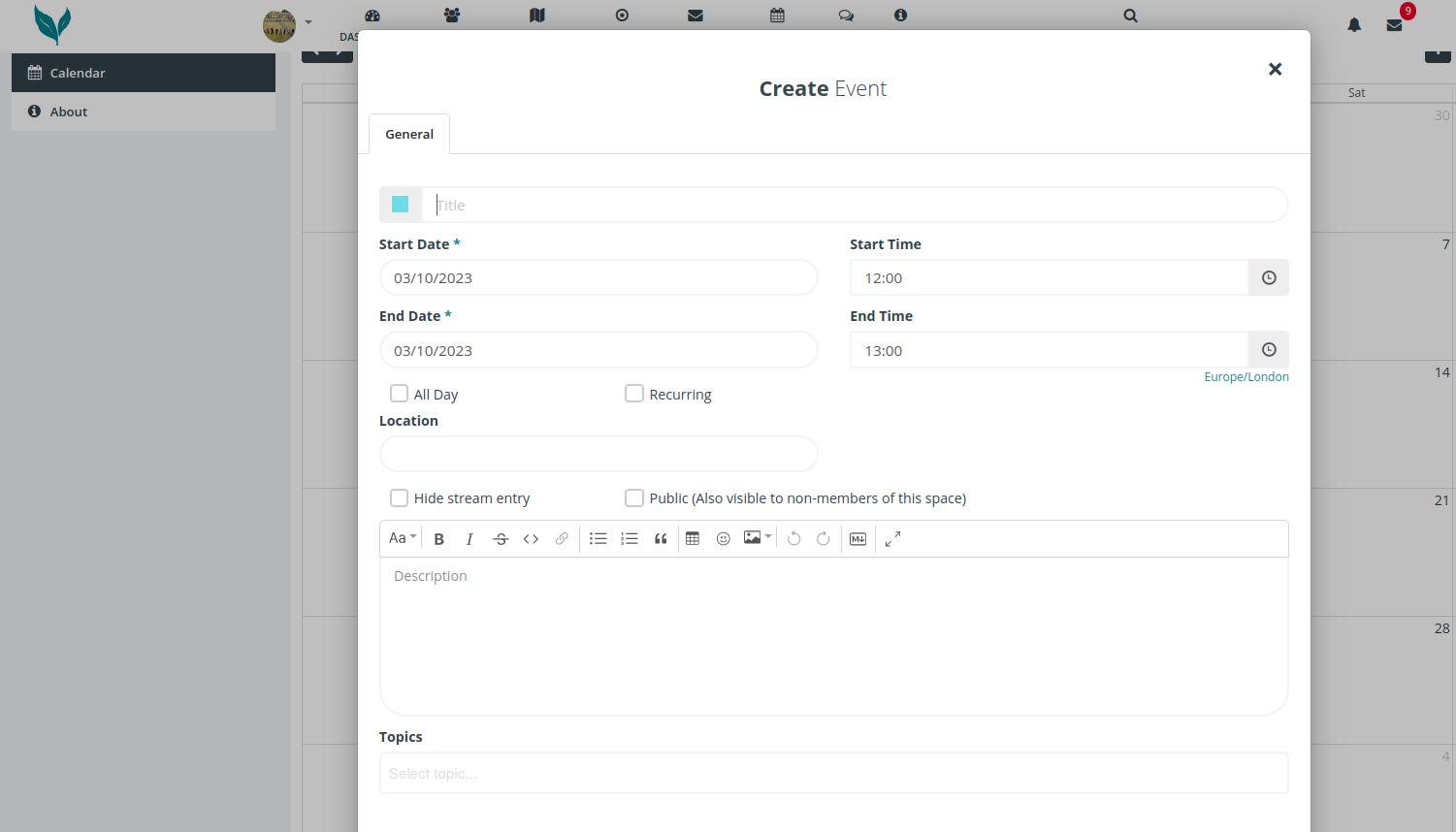
Most Spaces in the platform will have a calendar which you can add events to. To add an event click on the day you'd like to add the event.

[![add-event.png](https://knowledge.transition-space.org/uploads/images/gallery/2023-10/scaled-1680-/add-event.png)](https://knowledge.transition-space.org/uploads/images/gallery/2023-10/add-event.png)
The public events from all of these calendars are aggregated together in the main [calendar view](https://hub.transition-space.org/calendar/global/index)

[![main-calendar.png](https://knowledge.transition-space.org/uploads/images/gallery/2023-10/scaled-1680-/main-calendar.png)](https://knowledge.transition-space.org/uploads/images/gallery/2023-10/main-calendar.png)
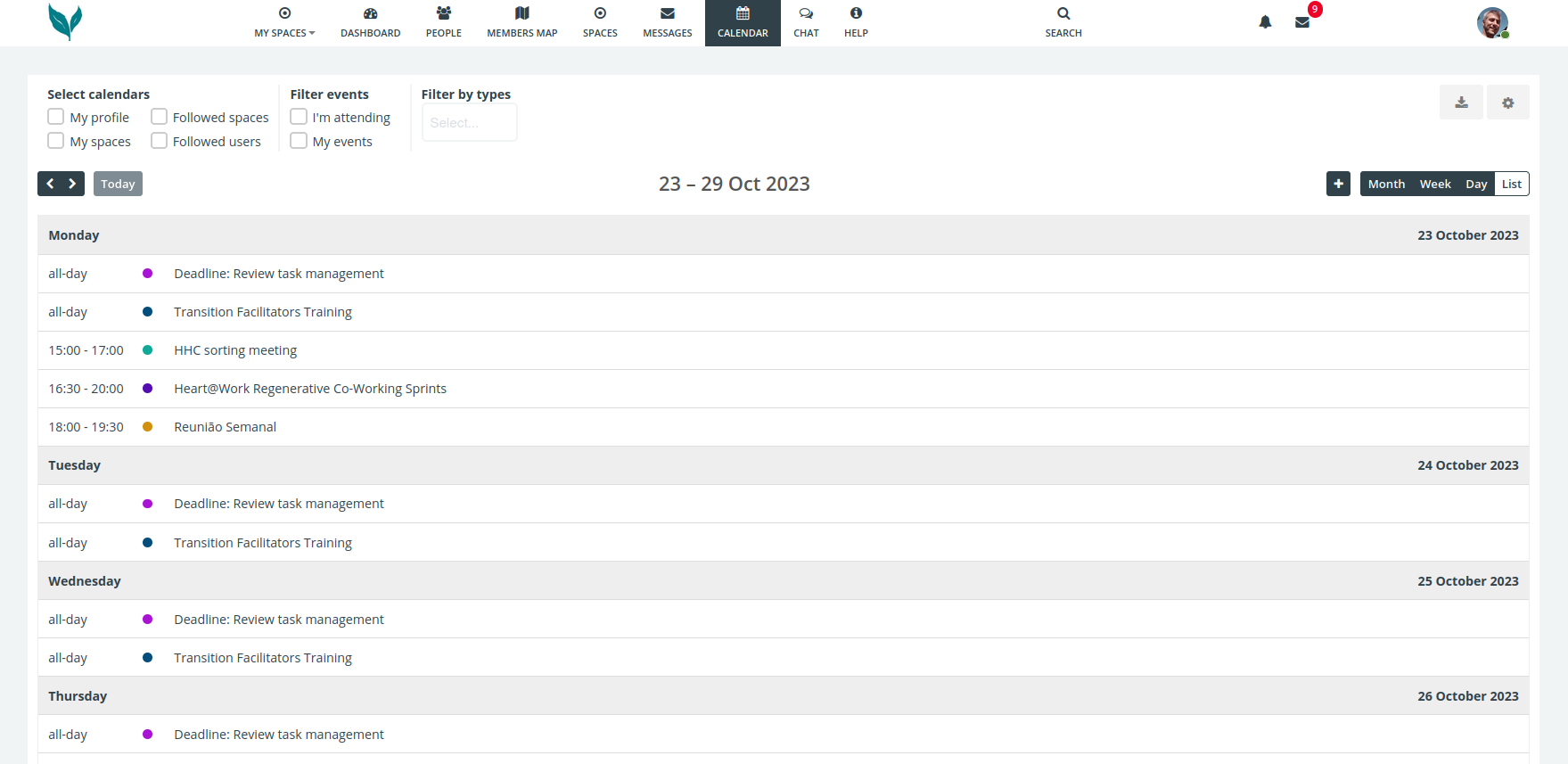
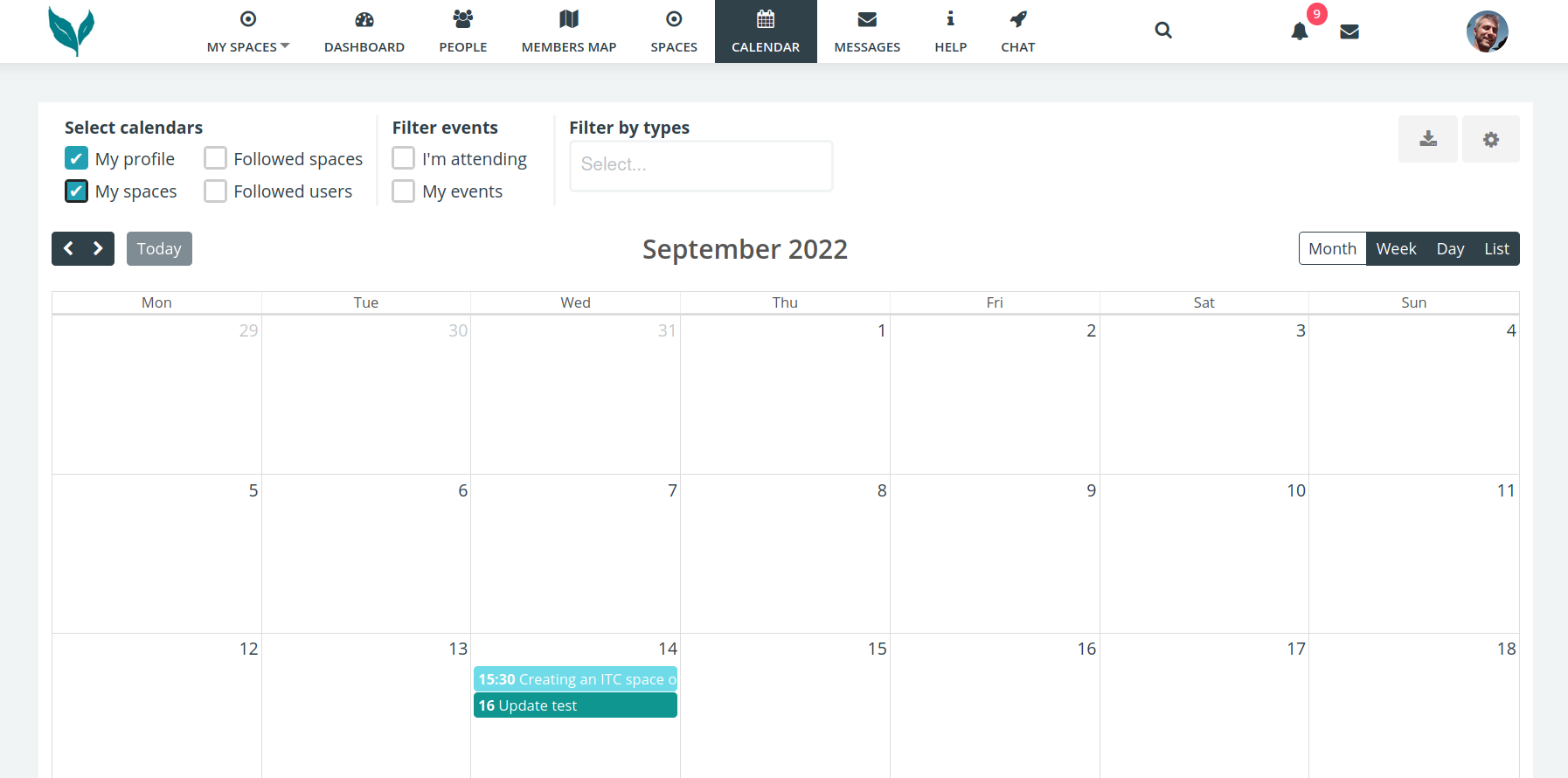
This view can be filtered using the checkboxes at the top left.

# Calendar export to Google calendar
<span style="font-family: 'Arial'; font-size: 11pt; color: #000000; mso-style-textfill-fill-color: #000000;">![](https://knowledge.transition-space.org/uploads/images/gallery/2023-10/embedded-image-zakojup3.png)</span>

<span style="font-family: 'Arial'; font-size: 11pt; color: #000000; mso-style-textfill-fill-color: #000000;">On the main calendar page in the top right click on the download/export icon.</span>

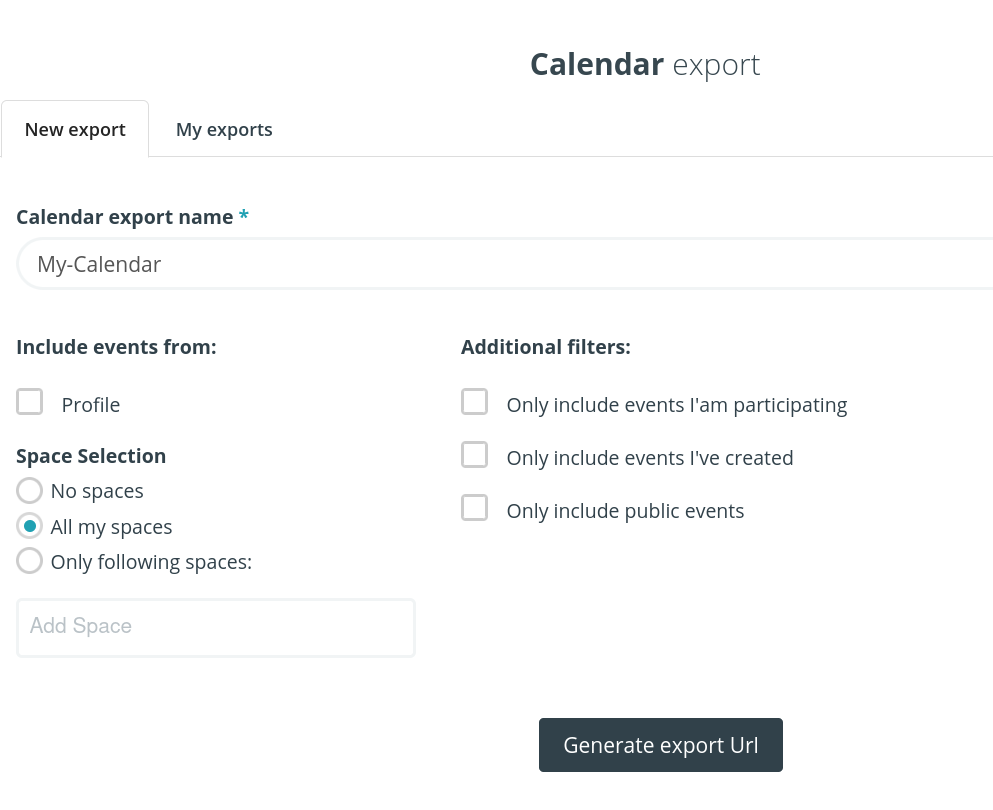
<span style="font-family: 'Arial'; font-size: 11pt; color: #000000; mso-style-textfill-fill-color: #000000;">In the Export popup give it a name &amp; tick ‘all my spaces’</span>

<span style="font-family: 'Arial'; font-size: 11pt; color: #000000; mso-style-textfill-fill-color: #000000;">![](https://knowledge.transition-space.org/uploads/images/gallery/2023-10/embedded-image-e7xyo8ff.png)</span>

<span style="font-family: 'Arial'; font-size: 11pt; color: #000000; mso-style-textfill-fill-color: #000000;">Then click on the Generate export Url button.</span><span style="font-family: 'Arial'; font-size: 11pt; color: #000000; mso-style-textfill-fill-color: #000000;"> (URL is another name for a link)</span>

<span style="font-family: 'Arial'; font-size: 11pt; color: #000000; mso-style-textfill-fill-color: #000000;">![](https://knowledge.transition-space.org/uploads/images/gallery/2023-10/embedded-image-ektdlqi9.png)</span>

<span style="font-family: 'Arial'; font-size: 11pt; color: #000000; mso-style-textfill-fill-color: #000000;">Copy to clipboard.</span>

<span style="font-family: 'Arial'; font-size: 11pt; color: #000000; mso-style-textfill-fill-color: #000000;">If you wish to sync with a Google calendar, then visit </span>[<span style="font-family: 'Arial'; font-size: 11pt; color: #0563c1; mso-style-textfill-fill-color: #0563c1;"><u>https://calendar.google.com/</u></span>](https://calendar.google.com/ "https://calendar.google.com/")

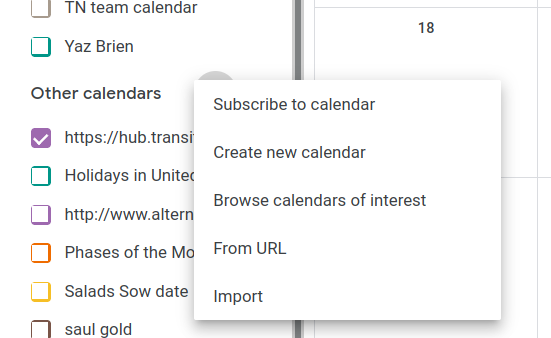
<span style="font-family: 'Arial'; font-size: 11pt; color: #000000; mso-style-textfill-fill-color: #000000;">In the left is + icon next to ‘other calendars’</span>

<span style="font-family: 'Arial'; font-size: 11pt; color: #000000; mso-style-textfill-fill-color: #000000;">![](https://knowledge.transition-space.org/uploads/images/gallery/2023-10/embedded-image-p9eet1ct.png)</span>

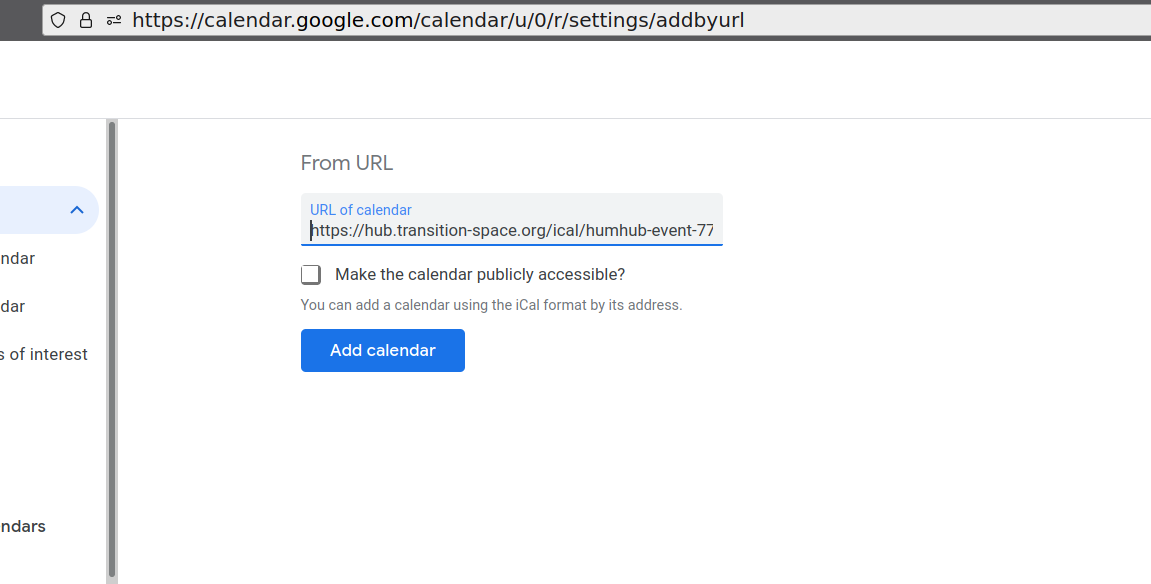
<span style="font-family: 'Arial'; font-size: 11pt; color: #000000; mso-style-textfill-fill-color: #000000;">Select ‘from URL’ menu option</span><span style="font-family: 'Arial'; font-size: 11pt; color: #000000; mso-style-textfill-fill-color: #000000;">, into which you paste the URL (link)</span>

<span style="font-family: 'Arial'; font-size: 11pt; color: #000000; mso-style-textfill-fill-color: #000000;">![](https://knowledge.transition-space.org/uploads/images/gallery/2023-10/embedded-image-dol6rsmg.png)</span>

<span style="font-family: 'Arial'; font-size: 11pt; color: #000000; mso-style-textfill-fill-color: #000000;">![](https://knowledge.transition-space.org/uploads/images/gallery/2023-10/embedded-image-gomjk4yu.png)</span>

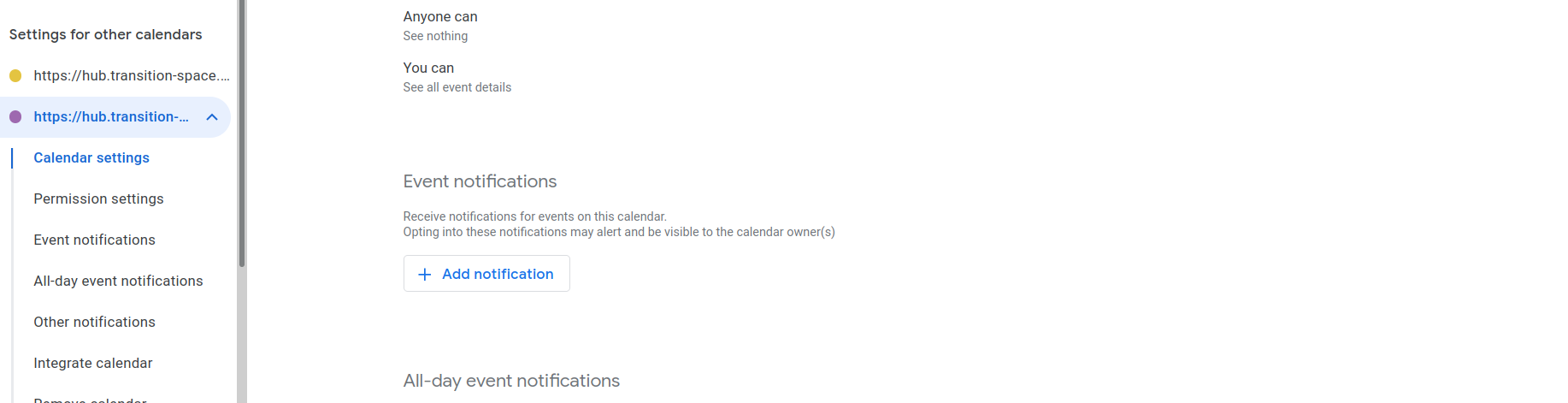
<span style="font-family: 'Arial'; font-size: 11pt; color: #000000; mso-style-textfill-fill-color: #000000;">Paste the URL you copied earlier and then click the ‘Add calendar’ button</span>
<span style="font-family: 'Arial'; font-size: 11pt; color: #000000; mso-style-textfill-fill-color: #000000;">![](https://knowledge.transition-space.org/uploads/images/gallery/2023-10/embedded-image-1jbna7lf.png)</span>

<span style="font-family: 'Arial'; font-size: 11pt; color: #000000; mso-style-textfill-fill-color: #000000;">In the left pane you should now see your calendar &amp; be able to adjust notifications if you wish to</span>

<span style="font-family: 'Arial'; font-size: 11pt; color: #000000; mso-style-textfill-fill-color: #000000;">![](https://knowledge.transition-space.org/uploads/images/gallery/2023-10/embedded-image-vfff0cqk.png)</span>

<span style="font-family: 'Arial'; font-size: 11pt; color: #000000; mso-style-textfill-fill-color: #000000;">So long as the calendar is ‘ticked’ you should now see your hub.transition-space.org events in your Google Calendar</span>

# Group video calls

Please [see here](https://knowledge.transition-space.org/books/video-calls-bbb/page/big-blue-button-intro)

# Linklist

If you have linklist enabled in your space you can

- Add links and comment on links others have posted
- Organize links in categories

[![link-home.png](https://knowledge.transition-space.org/uploads/images/gallery/2023-11/scaled-1680-/link-home.png)](https://knowledge.transition-space.org/uploads/images/gallery/2023-11/link-home.png)
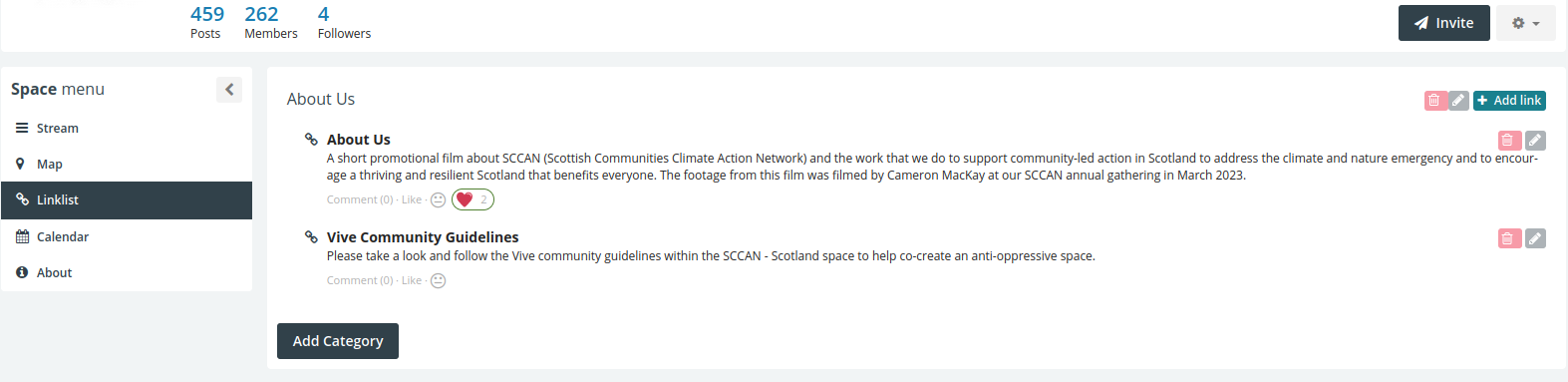
Below the new link interface

[![new-link.png](https://knowledge.transition-space.org/uploads/images/gallery/2023-11/scaled-1680-/new-link.png)](https://knowledge.transition-space.org/uploads/images/gallery/2023-11/new-link.png)
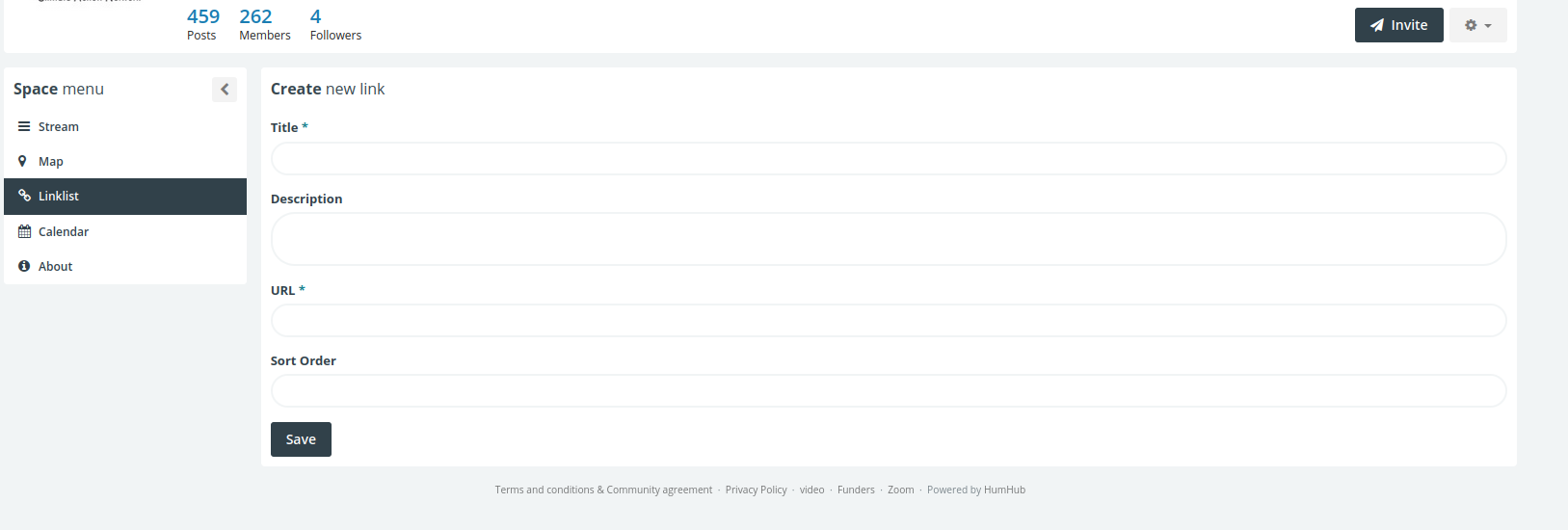
Below the new category interface

[![new-cat.png](https://knowledge.transition-space.org/uploads/images/gallery/2023-11/scaled-1680-/new-cat.png)](https://knowledge.transition-space.org/uploads/images/gallery/2023-11/new-cat.png)
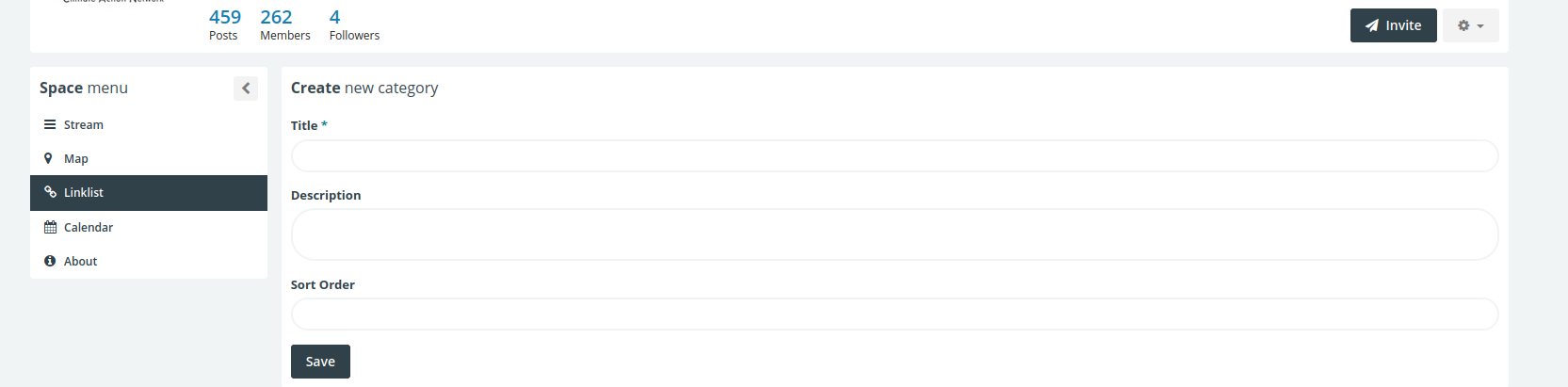
# Polls

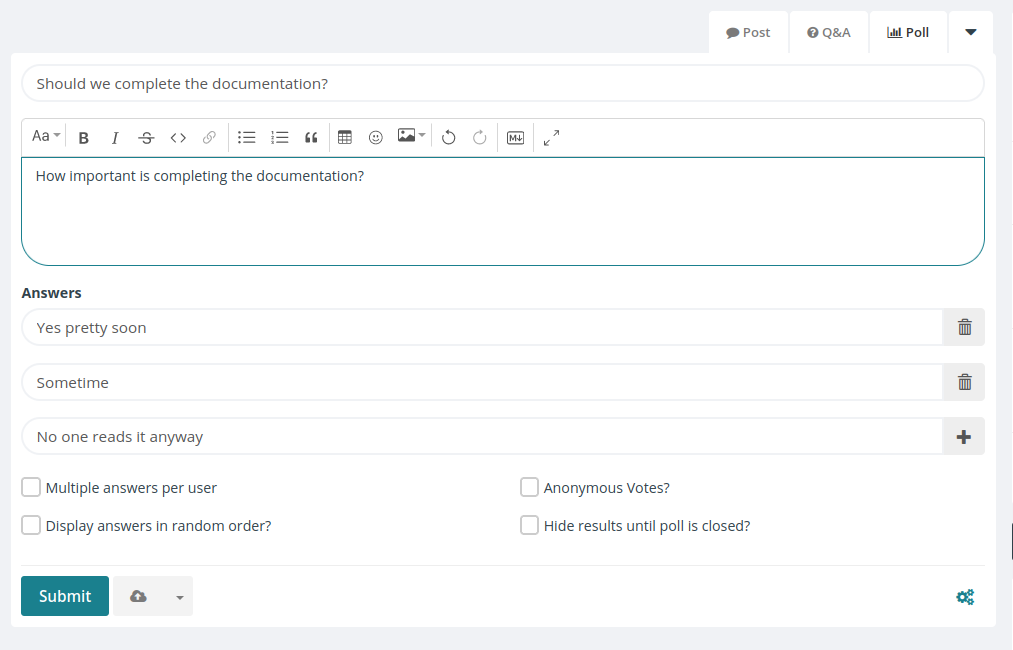
Stop discussing, let the votes speak for themselves. The Polls module allows you to resolve disputes quickly. Let the majority decide, or just get an opinion on your urgent questions.

In spaces where polls are enabled you will see the option in the top right tab of the post window.

[![docs.png](https://knowledge.transition-space.org/uploads/images/gallery/2024-04/scaled-1680-/docs.png)](https://knowledge.transition-space.org/uploads/images/gallery/2024-04/docs.png)
### Overviews

<div class="markdown-heading" dir="auto" id="bkmrk--1">[<svg aria-hidden="true" class="octicon octicon-link" height="16" version="1.1" viewbox="0 0 16 16" width="16"></svg>](https://github.com/humhub/polls#overviews)</div>- Offer single or multiple choice
- Hide the results until the poll is closed
- Vote anonymously
- Discuss the results in the comments

# Files

### Files

<div class="markdown-heading" dir="auto" id="bkmrk-">[<svg aria-hidden="true" class="octicon octicon-link" height="16" version="1.1" viewbox="0 0 16 16" width="16"></svg>](https://github.com/humhub/cfiles#files)</div>Enhance your network's efficiency with the Files Module, a complete solution for easy file management. This module enables you to manage and share important files throughout your network and team.

### Key Features

- **File Overview:** Get instant access to all files from your stream and profile.
- **Interact:** Comment on and like files for better collaboration and feedback.
- **Folder Structure:** Organize your files into unlimited folders and subfolders.
- **Migration:** Effortlessly move files and folders within your network.
- **File Info:** Always visible information about the creator, editor, and creation date.
- **Import Files:** Import files and folder structures directly from a .zip file.
- **Export Files:** Download folders and files in bulk as a .zip file.

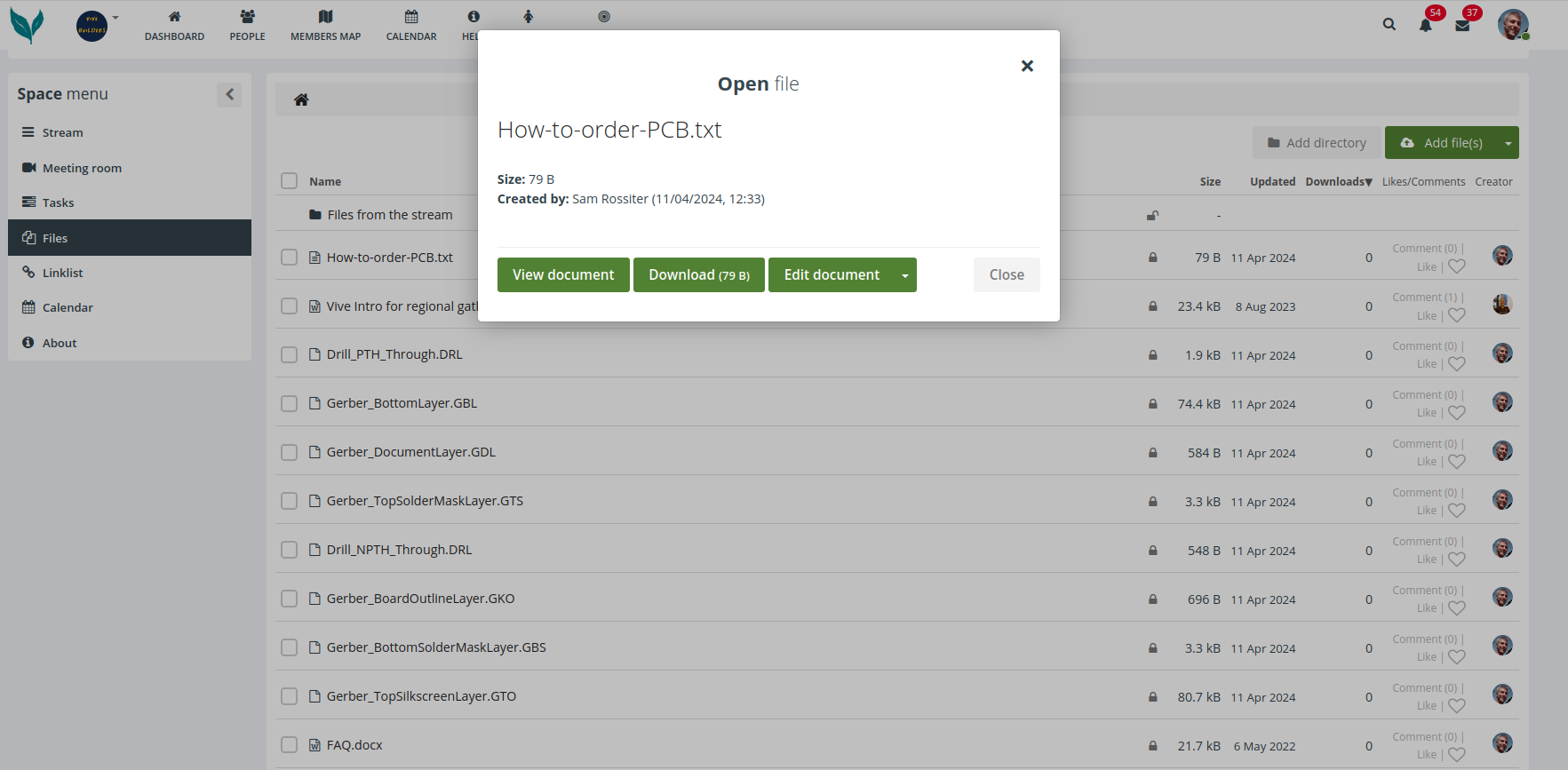
In the files tab you will see a list of all files that are available within your space. If you click on them you will be asked if you want to view, download or edit the document

### [![files.png](https://knowledge.transition-space.org/uploads/images/gallery/2024-04/scaled-1680-/files.png)](https://knowledge.transition-space.org/uploads/images/gallery/2024-04/files.png)
### Editor

If you select edit document you will see an editor interface open

[![editor.png](https://knowledge.transition-space.org/uploads/images/gallery/2024-04/scaled-1680-/editor.png)](https://knowledge.transition-space.org/uploads/images/gallery/2024-04/editor.png)
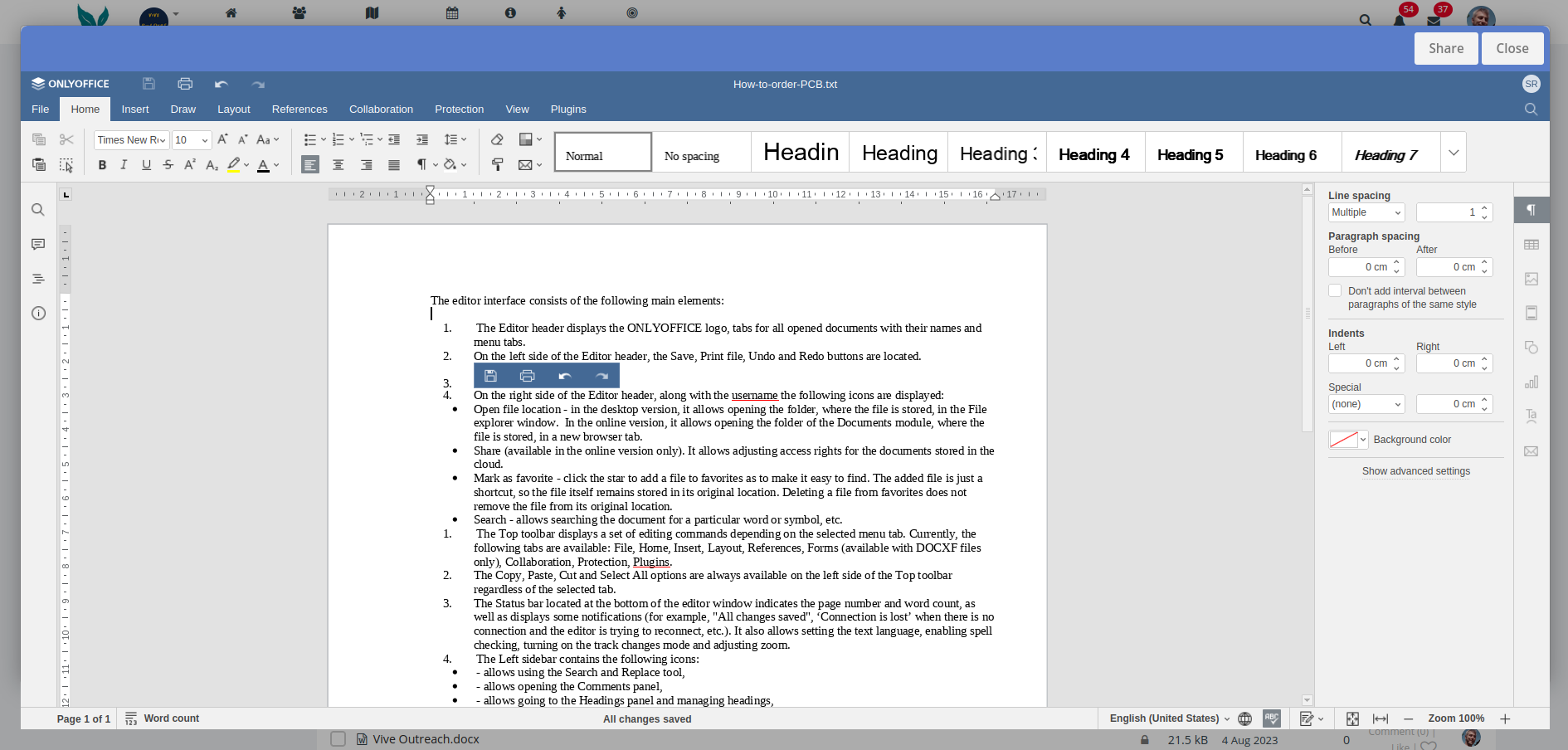
For further help using the editor check the [Only Office documentation](https://helpcenter.onlyoffice.com/ONLYOFFICE-Editors/ONLYOFFICE-Document-Editor/ProgramInterface/ProgramInterface.aspx)

# Task Manager

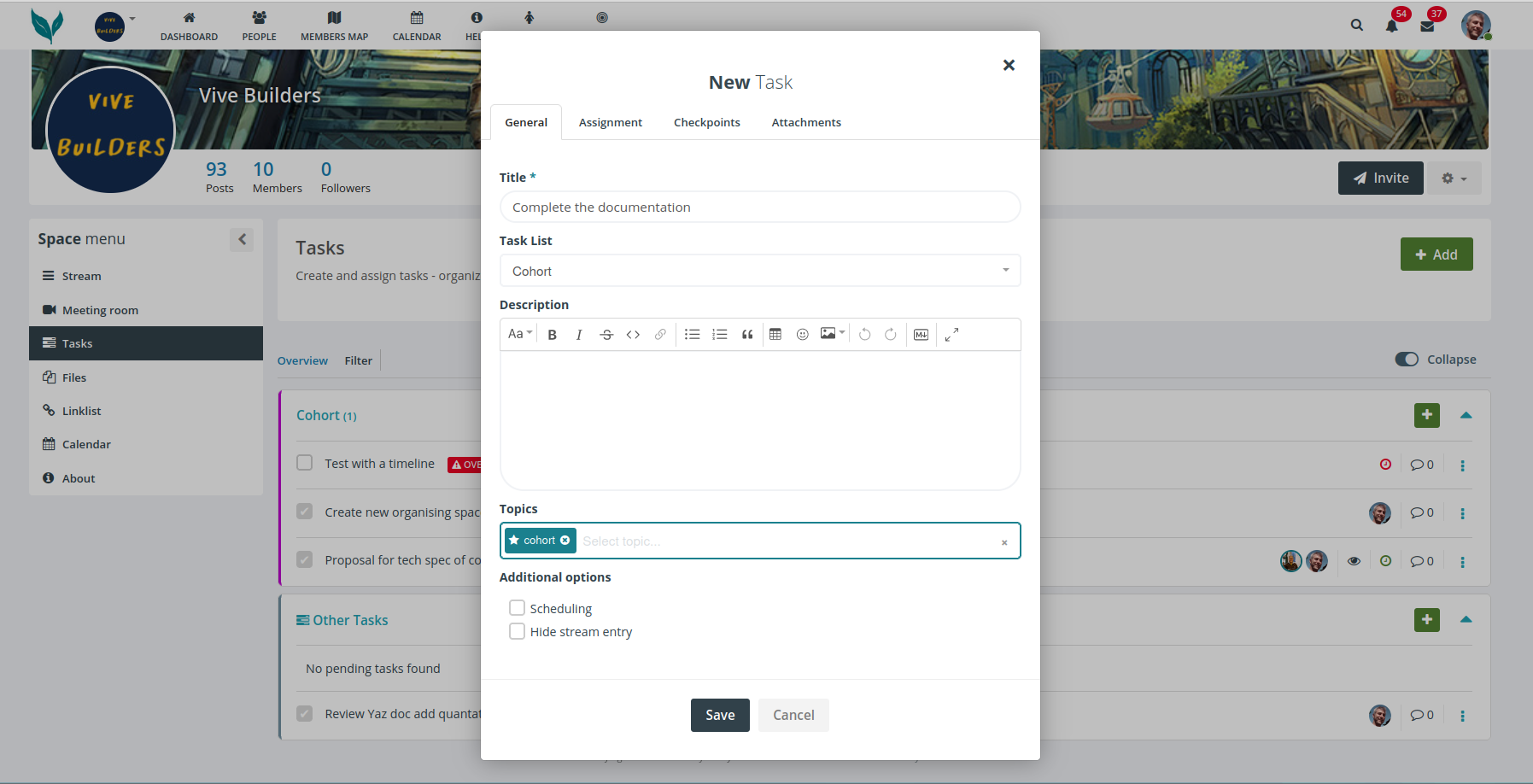
The tasks module allows you to create and manage projects and their tasks. You can collaborate on projects, users can create tasks and assign them to other users. Organise your team, optimize internal workflows and processes and keep track of your objectives. The intuitive to use module offers all main functions of a basic project management tool.

[![tasks.png](https://knowledge.transition-space.org/uploads/images/gallery/2024-04/scaled-1680-/tasks.png)](https://knowledge.transition-space.org/uploads/images/gallery/2024-04/tasks.png)
### Overview of functions and features:

<div class="markdown-heading" dir="auto" id="bkmrk--1">[<svg aria-hidden="true" class="octicon octicon-link" height="16" version="1.1" viewbox="0 0 16 16" width="16"></svg>](https://github.com/humhub/tasks#overview-of-functions-and-features)</div>- Creating projects and task lists
- Add subitems and checkpoints to these tasks
- Creating project descriptions with the built-in Richtext editor
- Add files and other attachments to your projects
- Enable scheduling and set deadlines for projects
- Appoint responsible users to review tasks
- Like and comment functions

The Tasks module also has an intuitive filtering system, is integrated with the search function and is connected to the notification system.

# Chat (Mattermost)

Please [see here](https://knowledge.transition-space.org/books/chat-mattermost)

# Timezone

<div id="bkmrk-when-you-signed-up-y">When you signed up you set a local timezone. That can be changed [here](https://hub.transition-space.org/user/account/edit-settings)   
</div><div id="bkmrk-">  
</div><div id="bkmrk-calendar-entries-are">Calendar entries are displayed in your local timezone.</div>

# Translation

<div id="bkmrk-your-local-language-">Your local language can be set [here](https://hub.transition-space.org/user/account/edit-settings)</div><div id="bkmrk-">  
</div><div id="bkmrk-when-viewing-posts-c">When viewing posts created by users who use a language other than your local language, you will see a 'Translate' button on their posts</div><div id="bkmrk--1">  
</div><div id="bkmrk--2">![](https://helpdesk.transition-space.org/storage/uploads/zcn4jxvjTyPK0ParQYVYd8iuW.png)</div><div id="bkmrk--3">  
</div><div id="bkmrk--4">  
</div><div id="bkmrk-this-service-is-prov">This service is provided by [DeepL](https://www.deepl.com/en/privacy)</div><div id="bkmrk--5"></div><div id="bkmrk-other-services-to-be">Other services to be explored</div><div id="bkmrk-amara">Amara</div><div id="bkmrk-weglot">Weglot</div><div id="bkmrk-transifex">Transifex</div>

# Privacy & data protection

Please see the policy here[ https://vive.transitiontogether.org.uk/legal/page/view?pageKey=terms](https://hub.transition-space.org/legal/page/view?pageKey=privacy)

# Deleting account

You can delete your account here [https://hub.transition-space.org/user/account/delete](https://hub.transition-space.org/user/account/delete)

# Further help

<iframe frameborder="0" id="bkmrk-%3E-1" scrolling="no" src="https://helpdesk.transition-space.org/help/3545223608" style="height: 900px; width: 100%;" title="Helpdesk">&gt;</iframe>